Send and track shipments
Sending shipments can be done in one of two ways:
Using the Shipping webservice
Using the Barcode, Labelling and Confirming webservice
This library supports both methods. In this sections we’ll go through all the available webservices.
Barcode webservice
Note
The barcode service allows you to generate barcodes for your shipment labels. Usually you would reserve an amount of barcodes, generate shipping labels and eventually confirm those labels. According to PostNL, this flow is necessary for a higher delivery success rate.
Generate a single barcode
You can generate a single barcode for domestic shipments as follows:
$postnl->generateBarcode();
This will generate a 3S barcode meant for domestic shipments only.
The method Firstred\PostNL\PostNL::generateBarcode accepts the following arguments:
- type
- Required:
FalseDefault:3SThe barcode type. This is 2S/3S for the Netherlands and EU Pack Special shipments. For other destinations this is your GlobalPack barcode type. For more info, check the PostNL barcode service page.
- range
- Required:
FalseDefault:null
- serie
- Required:
FalseDefault:nullThis is the barcode range for your shipment(s). Check the PostNL barcode service page for the ranges that are available.
- eps
- Required:
FalseDefault:falseIndicates whether this is an EU Pack Special shipment.
Generate a barcode by country code
It is possible to generate a barcode by country code. This will let the library figure out what type, range, serie to use.
Example:
$postnl->generateBarcodeByCountryCode('BE');
This will generate a 3S barcode meant for domestic shipments only.
The method Firstred\PostNL\PostNL::generateBarcodeByCountryCode accepts the following arguments:
- iso
- Required:
TrueThe two letter country ISO-3166 alpha-2 code. Make sure you use UPPERCASE. List of ISO-3166 codes: https://www.iban.com/country-codes
Generate multiple barcodes by using country codes
You can generate a whole batch of barcodes at once by providing country codes and the amounts you would like to generate.
Example:
$postnl->generatesBarcodeByCountryCodes(['NL' => 2, 'DE' => 3]);
The method Firstred\PostNL\PostNL::generateBarcodesByCountryCodes will return a list of barcodes:
[
    'NL' => [
        '3SDEVC11111111111',
        '3SDEVC22222222222',
    ],
    'DE' => [
        '3SDEVC111111111',
        '3SDEVC222222222',
        '3SDEVC333333333',
    ],
];
The function accepts the following argument:
- type
- Required:
TrueThis must be an associative array with country codes as key and the amount of barcodes you’d like to generate per country as the value.
Labelling webservice
Note
The labelling service allows you to create shipment labels and optionally confirm the shipments. The library has a built-in way to merge labels automatically, so you can request labels for multiple shipments at once.
Generate a single label
The following example generates a single shipment label for a domestic shipment:
$postnl = new PostNL(...);
$postnl->generateLabel(
    (new Shipment())
        ->setAddresses([
            (new Address())
                ->setAddressType('01')
                ->setCity('Utrecht')
                ->setCountrycode('NL')
                ->setFirstName('Peter')
                ->setHouseNr('9')
                ->setHouseNrExt('a bis')
                ->setName('de Ruijter')
                ->setStreet('Bilderdijkstraat')
                ->setZipcode('3521VA'),
            (new Address())
                ->setAddressType('02')
                ->setCity('Hoofddorp')
                ->setCompanyName('PostNL')
                ->setCountrycode('NL')
                ->setHouseNr('42')
                ->setStreet('Siriusdreef')
                ->setZipcode('2132WT'),
        ])
        ->setBarcode($barcode)
        ->setDeliveryAddress('01')
        ->setDimension(new Dimension('2000'))
        ->setProductCodeDelivery('3085'),
    'GraphicFile|PDF',
    false
);
This will create a standard shipment (product code 3085). You can access the label (base64 encoded PDF) this way:
$pdf = base64_decode($label->getResponseShipments()[0]->getLabels()[0]->getContent());
This function accepts the following arguments:
- shipment
- Required:
TrueThe
Firstred\PostNL\Entity\Shipmentobject. Visit the PostNL API documentation to find out what aFirstred\PostNL\Entity\Shipmentobject consists of. TheFirstred\PostNL\Entity\Shipmentobject is based on the SOAP API: https://developer.postnl.nl/browse-apis/send-and-track/labelling-webservice/documentation-soap/
- printerType
- Required:
TrueDefault:GraphicFile|PDFThe list of supported printer types can be found on this page: https://developer.postnl.nl/browse-apis/send-and-track/labelling-webservice/documentation-soap/
- confirm
- Required:
FalseDefault:trueIndicates whether the shipment should immediately be confirmed.
Generate multiple shipment labels
The following example shows how a label can be merged:
$shipments = [
    (new Shipment())
        ->setAddresses([
            (new Address())
                ->setAddressType('01')
                ->setCity('Utrecht')
                ->setCountrycode('NL')
                ->setFirstName('Peter')
                ->setHouseNr('9')
                ->setHouseNrExt('a bis')
                ->setName('de Ruijter')
                ->setStreet('Bilderdijkstraat')
                ->setZipcode('3521VA')
        ])
        ->setBarcode($barcodes['NL'][0])
        ->setDimension(new Dimension('1000'))
        ->setProductCodeDelivery('3085'),
    (new Shipment())
        ->setAddresses([
            (new Address())
                ->setAddressType('01')
                ->setCity('Utrecht')
                ->setCountrycode('NL')
                ->setFirstName('Peter')
                ->setHouseNr('9')
                ->setHouseNrExt('a bis')
                ->setName('de Ruijter')
                ->setStreet('Bilderdijkstraat')
                ->setZipcode('3521VA)
        ])
        ->setBarcode($barcodes['NL'][1])
        ->setDimension(new Dimension('1000'))
        ->setProductCodeDelivery('3085)
];

$label = $postnl->generateLabels(
    $shipments,
    'GraphicFile|PDF', // Printertype (only PDFs can be merged -- no need to use the Merged types)
    true, // Confirm immediately
    true, // Merge
    Label::FORMAT_A4, // Format -- this merges multiple A6 labels onto an A4
    [
        1 => true,
        2 => true,
        3 => true,
        4 => true,
    ] // Positions
);

file_put_contents('labels.pdf', $label);
By setting the merge flag it will automatically merge the labels into a PDF string.
The function accepts the following arguments:
- shipments
- Required:
TrueAn array with
Firstred\PostNL\Entity\Shipmentobjects. Visit the PostNL API documentation to find out what aFirstred\PostNL\Entity\Shipmentobject consists of. TheFirstred\PostNL\Entity\Shipmentobject is based on the SOAP API: https://developer.postnl.nl/browse-apis/send-and-track/labelling-webservice/documentation-soap/
- printerType
- Required:
FalseDefault:GraphicFile|PDFThe list of supported printer types can be found on this page: https://developer.postnl.nl/browse-apis/send-and-track/labelling-webservice/documentation-soap/
- confirm
- Required:
FalseDefault:trueIndicates whether the shipment should immediately be confirmed.
- merge
- Required:
FalseDefault:falseThis will merge the labels and make the function return a pdf string of the merged label.
- format
- Required:
FalseDefault:Firstred\PostNL\PostNL::FORMAT_A4This sets the paper format (can be Firstred\PostNL\PostNL::FORMAT_A4 or Firstred\PostNL\PostNL::FORMAT_A6).
- positions
- Required:
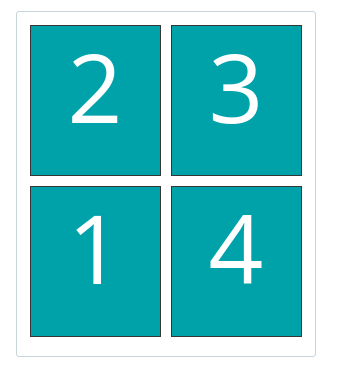
FalseDefault:[1 => true, 2 => true, 3 => true, 4 => true]This will set the positions of the labels. The following image shows the available positions, use true or false to resp. enable or disable a position:
Shipping webservice
Note
The shipping service combines all the functionality of the labeling, confirming, barcode and easy return service. The service is only available as REST.
Send a single shipment
The following example sends a single domestic shipment:
$postnl = new PostNL(...);
$postnl->sendShipment(
    (new Shipment())
        ->setAddresses([
            (new Address())
                ->setAddressType('01')
                ->setCity('Utrecht')
                ->setCountrycode('NL')
                ->setFirstName('Peter')
                ->setHouseNr('9')
                ->setHouseNrExt('a bis')
                ->setName('de Ruijter')
                ->setStreet('Bilderdijkstraat')
                ->setZipcode('3521VA'),
            (new Address())
                ->setAddressType('02')
                ->setCity('Hoofddorp')
                ->setCompanyName('PostNL')
                ->setCountrycode('NL')
                ->setHouseNr('42')
                ->setStreet('Siriusdreef')
                ->setZipcode('2132WT'),
        ])
        ->setDeliveryAddress('01')
        ->setDimension(new Dimension('2000'))
        ->setProductCodeDelivery('3085'),
    'GraphicFile|PDF',
    false
);
This will create a standard shipment (product code 3085). You can access the label (base64 encoded PDF) this way:
$pdf = base64_decode($shipping->getResponseShipments()[0]->getLabels()[0]->getContent());
This function accepts the following arguments:
- shipment
- Required:
TrueThe
Firstred\PostNL\Entity\Shipmentobject. Visit the PostNL API documentation to find out what a Shipment object consists of.
- printertype
- Required:
FalseDefault:GraphicFile|PDFThe list of supported printer types can be found on this page: https://developer.postnl.nl/browse-apis/send-and-track/shipping-webservice/documentation/
- confirm
- Required:
FalseDefault:trueIndicates whether the shipment should immediately be confirmed.
Send multiple shipments
The following example shows how labels of multiple shipment labels can be merged:
$shipments = [
     (new Shipment())
         ->setAddresses([
             (new Address())
                 ->setAddressType('01')
                 ->setCity('Utrecht')
                 ->setCountrycode('NL')
                 ->setFirstName('Peter')
                 ->setHouseNr('9')
                 ->setHouseNrExt('a bis')
                 ->setName('de Ruijter')
                 ->setStreet('Bilderdijkstraat')
                 ->setZipcode('3521VA')
         ])
         ->setBarcode($barcodes['NL'][0])
         ->setDimension(new Dimension('1000'))
         ->setProductCodeDelivery('3085'),
     (new Shipment())
         ->setAddresses([
             (new Address())
                 ->setAddressType('01')
                 ->setCity('Utrecht')
                 ->setCountrycode('NL')
                 ->setFirstName('Peter')
                 ->setHouseNr('9')
                 ->setHouseNrExt('a bis')
                 ->setName('de Ruijter')
                 ->setStreet('Bilderdijkstraat')
                 ->setZipcode('3521VA)
         ])
         ->setBarcode($barcodes['NL'][1])
         ->setDimension(new Dimension('1000'))
         ->setProductCodeDelivery('3085)
 ];

 $label = $postnl->sendShipments(
     $shipments,
     'GraphicFile|PDF', // Printertype (only PDFs can be merged -- no need to use the Merged types)
     true, // Confirm immediately
     true, // Merge
     Label::FORMAT_A4, // Format -- this merges multiple A6 labels onto an A4
     [
         1 => true,
         2 => true,
         3 => true,
         4 => true,
     ] // Positions
 );

 file_put_contents('labels.pdf', $label);
By setting the merge flag it will automatically merge the labels into a PDF string.
The function accepts the following arguments:
- shipments
- Required:
TrueAn array with
Firstred\Entity\Shipmentobjects. Visit the PostNL API documentation to find out what a Shipment object consists of.
- printertype
- Required:
FalseDefault:GraphicFile|PDFThe list of supported printer types can be found on this page: https://developer.postnl.nl/browse-apis/send-and-track/shipping-webservice/documentation/
- confirm
- Required:
FalseDefault:trueIndicates whether the shipment should immediately be confirmed.
- merge
- Required:
FalseDefault:falseThis will merge the labels and make the function return a pdf string of the merged label.
- format
- Required:
FalseDefault:Firstred\PostNL\PostNL::FORMAT_A4This sets the paper format (can be
Firstred\PostNL\PostNL::FORMAT_A4orFirstred\PostNL\PostNL::FORMAT_A6).
- positions
- Required:
FalseDefault:[1 => true, 2 => true, 3 => true, 4 => true]This will set the positions of the labels. The following image shows the available positions, use
trueorfalseto resp. enable or disable a position:
Confirming webservice
Note
You can confirm shipments that have previously not been confirmed. Shipments can be confirmed after both the Labelling webservice or the Shipping webservice.
The available methods are Firstred\PostNL\PostNL::confirmShipment and Firstred\PostNL\PostNL::confirmShipments. The first method accepts a single Firstred\PostNL\Entity\Shipment object whereas the latter accepts an array of :php:class:`Firstred\PostNL\Entity\Shipment`s.
Example code:
$postnl = new PostNL(...);

$confirmedShipment = $postnl->confirmShipment(
    (new Shipment())
        ->setAddresses([
            (new Address())
                ->setAddressType('01')
                ->setCity('Utrecht')
                ->setCountrycode('NL')
                ->setFirstName('Peter')
                ->setHouseNr('9')
                ->setHouseNrExt('a bis')
                ->setName('de Ruijter')
                ->setStreet('Bilderdijkstraat')
                ->setZipcode('3521VA'),
            (new Address())
                ->setAddressType('02')
                ->setCity('Hoofddorp')
                ->setCompanyName('PostNL')
                ->setCountrycode('NL')
                ->setHouseNr('42')
                ->setStreet('Siriusdreef')
                ->setZipcode('2132WT'),
        ])
        ->setBarcode('3SDEVC201611210')
        ->setDeliveryAddress('01')
        ->setDimension(new Dimension('2000'))
        ->setProductCodeDelivery('3085')
);
The output is a Firstred\PostNL\Entity\Respone\ConfirmingResponseShipment or an array with these objects in case you are confirming multiple shipments. The results array will have the same index keys as the request input.
Shippingstatus webservice
Note
This service can be used to retrieve shipping statuses. For a short update request a current status, otherwise complete status will provide you with a long list containing the shipment’s history.
Current or complete shipping status by barcode
Gets the current or complete status by barcode. A complete status also includes the shipment history.
$postnl = new PostNL(...);
$postnl->getShippingStatusByBarcode('3SDEVC98237423');
- barcode
- Required:
TrueThe barcode, e.g.:
3SDEVC98237423
- complete
- Required:
FalseReturn the complete shipping status. This includes the shipment history.
Depending on the complete parameter this returns a Firstred\PostNL\Entity\Response\CurrentStatusResponseShipment or a Firstred\PostNL\Entity\Response\CompleteStatusResponseShipment object.
Multiple current or complete shipping statuses by barcodes
Gets multiple current or complete statuses by barcodes. A complete status also includes the shipment history.
$postnl = new PostNL(...);
$postnl->getShippingStatusesByBarcodes(['3SDEVC98237423', '3SDEVC98237423']);
- barcodes
- Required:
TrueThe references, e.g.:
['3SDEVC98237423', '3SDEVC98237423']
- complete
- Required:
FalseReturn the complete shipping status. This includes the shipment history.
Depending on the complete parameter this returns an array with Firstred\PostNL\Entity\Response\CurrentStatusResponseShipment or Firstred\PostNL\Entity\Response\CompleteStatusResponseShipment objects.
The array is an associative array indexed by the given barcodes, e.g.: ['3SDEVC98237423' => CurrentStatusResponseShipment, ...].
Current or complete shipping status by reference
Gets the current or complete status by reference. A complete status also includes the shipment history.
$postnl = new PostNL(...);
$postnl->getShippingStatusByReference('order-12');
- reference
- Required:
TrueThe barcode, e.g.:
order-12
- complete
- Required:
FalseReturn the complete shipping status. This includes the shipment history.
Depending on the complete parameter this returns a Firstred\PostNL\Entity\Response\CurrentStatusResponseShipment or a Firstred\PostNL\Entity\Response\CompleteStatusResponseShipment object.
Multiple current or complete shipping statuses by references
Gets multiple current or complete statuses by references. A complete status also includes the shipment history.
$postnl = new PostNL(...);
$postnl->getShippingStatusesByReferences(['order-12', 'order-16']);
- barcodes
- Required:
TrueThe references, e.g.:
['order-12', 'order-16]
- complete
- Required:
FalseReturn the complete shipping status. This includes the shipment history.
Depending on the complete parameter this returns an array with Firstred\PostNL\Entity\Response\CurrentStatusResponseShipment or Firstred\PostNL\Entity\Response\CompleteStatusResponseShipment objects.
The array is an associative array indexed by the given references, e.g.: ['order-12' => CurrentStatusResponseShipment, ...].
Current status by status code
Warning
This is no longer supported by the PostNL API.
Current status by phase code
Gets the current status by phase code. Note that the date range is required.
Warning
This is no longer supported by the PostNL API
Complete status by status code
Warning
This is no longer supported by the PostNL API.
Complete status by phase code
Warning
This is no longer supported by the PostNL API.
Get a single signature by barcode
Gets the signature of the shipment when available. A signature can be accessed by barcode only.
$postnl = new PostNL(...);
$postnl->getSignatureByBarcode('3SDEVC23987423');
It accepts the following arguments
- barcode
- Required:
TrueThe shipment’s barcode, e.g.
3SDEVC23987423
This method returns a Firstred\PostNL\Entity\Response\GetSignatureResponseSignature object. To get the actual signature in binary format you will have to use:
$postnl = new PostNL(...);

$getSignatureResponseSignature = $postnl->getSignatureByBarcode('3SDEVC23987423');
$content = base64_decode($getSignatureResponseSignature->getSignatureImage());

header('Content-Type: image/gif');
echo $content;
exit;
Get multiple signatures by barcodes
Gets multiple signatures of multiple shipments, when available.
$postnl = new PostNL(...);
$postnl->getSignaturesByBarcodes(['3SDEVC23987423', '3SDEVC23987425']);
It accepts the following arguments
- barcodes
- Required:
TrueAn array of barcodes, e.g.
['3SDEVC23987423', '3SDEVC23987425'].
It returns an array of Firstred\PostNL\Entity\Response\GetSignatureResponseSignature objects.
To get the image data out of these objects, see Get a single signature by barcode.